Lately I’ve been simplifying how I film content for social media.
Whether I’m recording short videos, making creams, or working on small projects, I realized I don’t need a complicated setup. What matters most is having something stable, easy to use, and quick to set up.
This is the simple setup I use for filming table videos and hands-on content.
Why Filming for Social Media Is Different
Filming yourself and filming your hands are two completely different setups.
When creating content for social media — especially for Instagram, Pinterest, or short videos — you often need:
- a clear view of your hands
- a clean and stable frame
- enough space to work naturally
A regular tripod can work, but it’s not always the most comfortable solution for table filming.
My Simple Setup
Instead of overcomplicating things, I focus on two basic tools:
- a tripod for general filming
- a small overhead phone holder for table work
This combination gives flexibility without making the setup complicated.
Tripod Options for Filming
For general filming, I prefer using a tripod that works with both a phone and a camera.
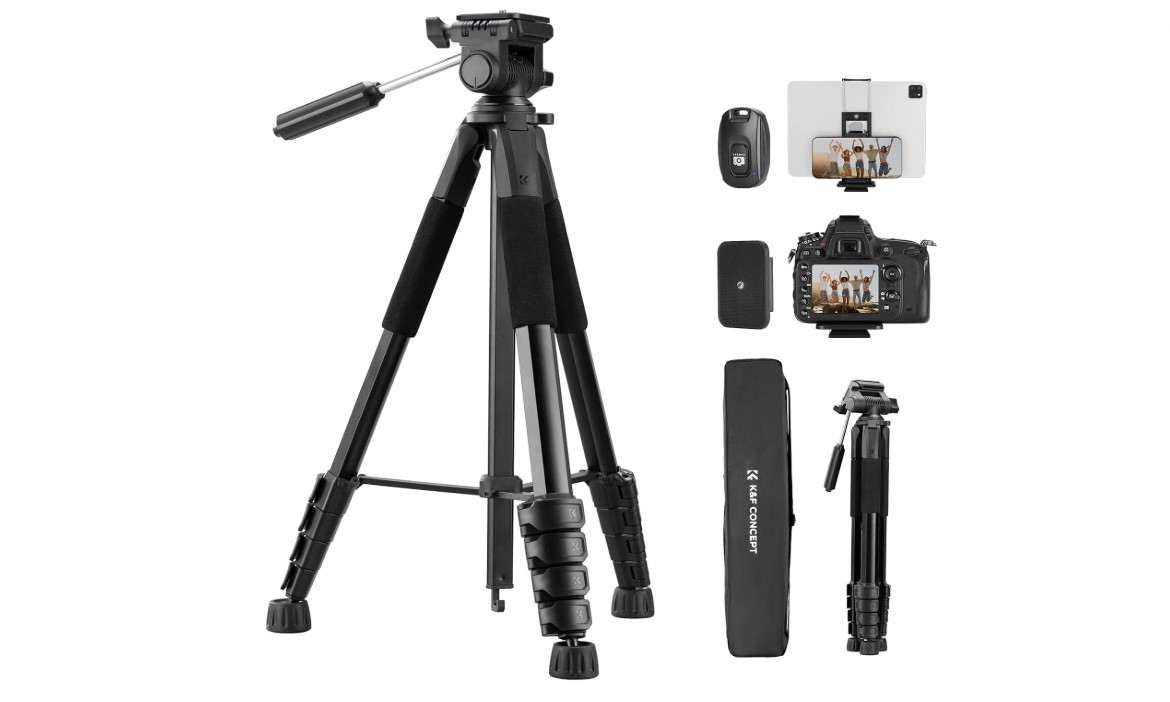
1. K&F Concept 75” Tripod (Best Overall)
For reference, this is the type of tripod I was looking at:
K&F Concept 75” Tripod
This is the most balanced option if you want one tripod for everything.
What I like about it:
- works with iPhone and digital cameras
- adjustable height (table or standing)
- stable enough for outdoor use
- lightweight and easy to carry
- includes phone holder and remote
This is the option I would personally choose because it covers most situations.
2. Budget Tripod (Simple Indoor Option)
Amazon Basics 60-Inch Lightweight Tripod
If you just want something basic to start with, a simple lightweight tripod can work well.
Good for:
- indoor filming
- simple videos
- occasional use
Keep in mind that these are usually less stable and not ideal for outdoor or night photography.
3. Tripod with Light (Content Creation Setup)
UBeesize 12” Ring Light with Tripod Stand
Some tripods include a built-in light, which can be useful if you don’t have consistent natural lighting.
Good for:
- filming videos
- social media content
- quick setups
Less ideal if you want something more minimal or for outdoor use.
Overhead Phone Holder (For Table Videos)
For filming hands, a simple overhead phone holder makes a big difference.
1. Lamicall Gooseneck Phone Holder (BEST SIMPLE)
For reference, this is the type of setup I was looking at:
Lamicall Gooseneck Phone Holder
This attaches directly to your table and holds your phone above your workspace.
What I like about it:
- perfect for filming hands
- clean top-down view
- easy to adjust
- compact and affordable
This is the simplest and most practical option for most setups.
2. More Stable Overhead Arm
If you want something more solid, there are sturdier versions with fixed arms.
Good for:
- longer filming sessions
- less movement
- more precise positioning
3. Flexible Multi-Angle Clamp
Flexible Multi-Angle Clamp
This type allows more flexibility in positioning your phone.
Good for:
- experimenting with angles
- combining top and side views
- more creative filming
Using a Tripod for Angled Shots
Even for table content, a tripod is still useful: Neewer Overhead Camera Mount
By placing it slightly above the table and tilting the phone downward, you can create a softer, more natural angle.
This works well for:
- lifestyle-style videos
- casual content
- less structured filming
Lighting (Keep It Simple)
I try to keep lighting as natural as possible.
Most of the time:
- I film near a window
- I avoid harsh direct sunlight
- I keep the setup minimal
Natural light usually looks better than complicated setups, especially for social media.
A Simple Filming Workflow
Instead of focusing on perfection, I keep everything simple:
- set up the phone
- press record
- film naturally
- trim the video later
This makes the process easier and more consistent.
Final Thoughts
You don’t need a complex setup to start creating content.
A simple combination of:
- a tripod
- and an overhead phone holder
is more than enough for filming social media videos, table content, and everyday creative projects.
The simpler your setup is, the more likely you are to actually use it.
If you’re interested in how this kind of setup connects to creating content more consistently, I’ve written more about social media platforms and how content works across different channels:
FAQ
Do I need both a tripod and an overhead clamp?
Not necessarily. A tripod can handle most filming, but an overhead clamp makes table videos much easier and cleaner.
Can I film hands-on videos with just a tripod?
Yes, by angling the camera downward. However, a clamp gives a better top-down view and is easier to work with.
What is the best tripod for beginners?
A simple lightweight tripod with a phone holder is a good place to start. You don’t need anything complicated in the beginning.
Do I need a ring light for filming?
Not always. Natural light from a window often works better and looks more natural for social media content.
Is a more expensive setup worth it?
Only if you’re filming regularly. For most people, a simple tripod and clamp setup is more than enough.